

 |
Full form of Computer 
|
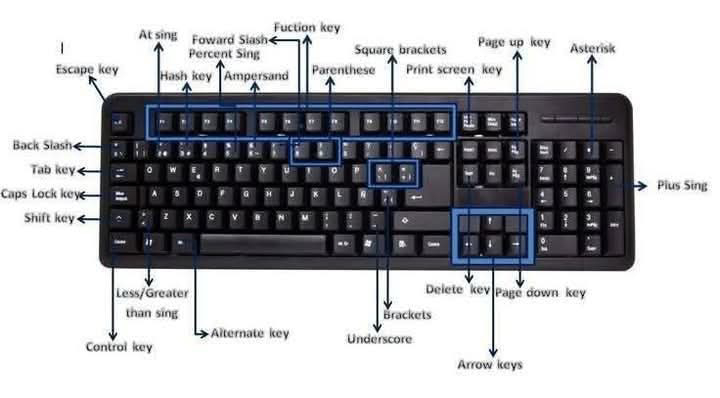

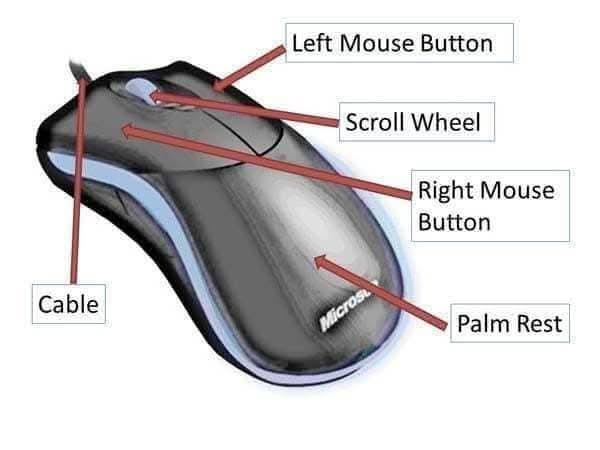

There are a few more abbreviatios related to computer;
Here's a list of common abbreviations related to computer along with their full form:
(alphabetically arranged)
▪️AI: Artificial Intelligence
▪️AUI: Attachment Unit Interface
▪️ALGOL: ALGOrithmic Language
▪️ASCII: American Standard Code for Information Interchange
▪️AGP: Accelerated Graphics Port
▪️ARP: Address Resolution Protocol
▪️AVI: Audio Video Interleave
▪️ARPANET: Advanced Reasearch Projects Agency Network
▪️BCD: Binary Coded Decimal
▪️CPU: Central Processing Unit
▪️CAD: Computer-Aided Design
▪️CD-RW: Compact Disc Rewritable
▪️COBOL: Common Business Oriented Language
▪️HDD: Hard Disk Drive
▪️LCD:
▪️LED:
▪️OS: Operating System
▪️PC: Personal Computer
▪️RAM: Random Access Memory
▪️ROM: Read-Only Memory: It's a type of memory that stores permanent data and typically used for booting up devices or storing framework. It's a non-volatile memory, meaning it retains its contents even when the power is turned off.
GB: Giga byeteMB: Mega byeteKB: Kilo byete
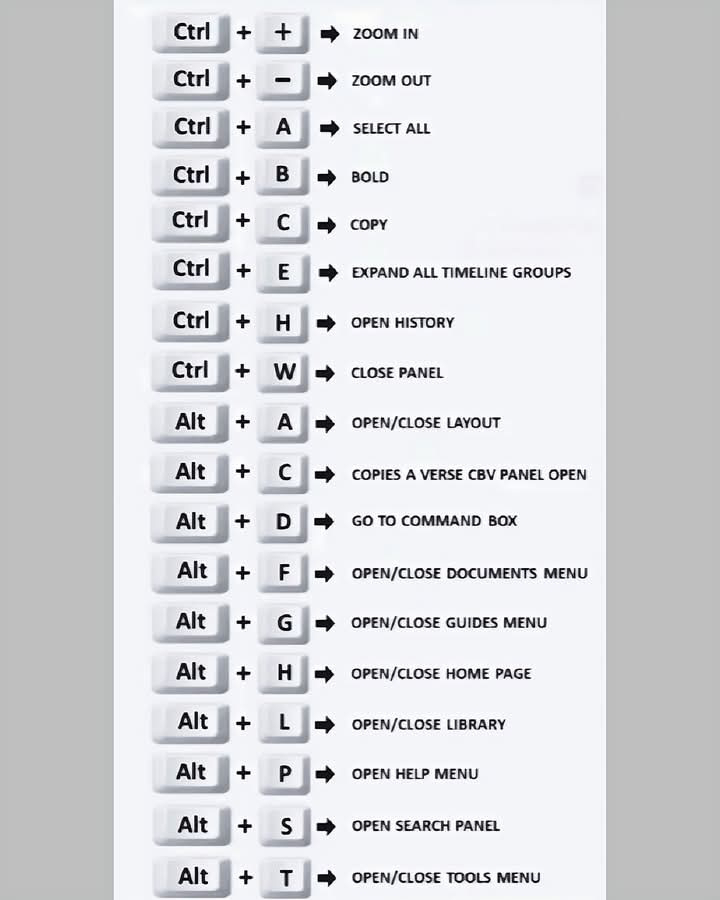

1️⃣ Ctrl + N 🆕 – নতুন ডকুমেন্ট খুলে দেবে।2️⃣ Ctrl + O 📂 – পুরনো ডকুমেন্ট ওপেন করবে।3️⃣ Ctrl + S 💾 – যেকোনো সময় ফাইল সেভ করবে।4️⃣ F12 ✏️ – “Save As” ডায়ালগ খুলবে।5️⃣ Ctrl + P 🖨️ – প্রিন্ট কমান্ড খুলবে।6️⃣ Ctrl + C 📋 – নির্বাচিত লেখা বা ছবি কপি করবে।7️⃣ Ctrl + X ✂️ – কাট করবে।8️⃣ Ctrl + V 📥 – পেস্ট করবে।9️⃣ Ctrl + Z ↩️ – Undo করবে।🔟 Ctrl + Y ↪️ – Redo করবে।1️⃣1️⃣ Ctrl + A 🧾 – পুরো ডকুমেন্ট সিলেক্ট করবে।1️⃣2️⃣ Ctrl + F 🔍 – নির্দিষ্ট শব্দ খুঁজবে।1️⃣3️⃣ Ctrl + H 🔁 – Replace করে শব্দ বদলাবে।1️⃣4️⃣ Ctrl + K 🌐 – Hyperlink যুক্ত করবে।1️⃣5️⃣ Ctrl + B 🅱️ – Bold করবে।1️⃣6️⃣ Ctrl + I ✒️ – Italic করবে।1️⃣7️⃣ Ctrl + U ⬆️ – Underline দেবে।1️⃣8️⃣ Ctrl + E 🧭 – Center align করবে।1️⃣9️⃣ Ctrl + L ⬅️ – Left align করবে।2️⃣0️⃣ Ctrl + R ➡️ – Right align করবে।2️⃣1️⃣ Ctrl + J 📄 – Justify করবে।2️⃣2️⃣ Ctrl + M ➡️ – Paragraph indent বাড়াবে।2️⃣3️⃣ Ctrl + Shift + M ⬅️ – Indent কমাবে।2️⃣4️⃣ Ctrl + T 📏 – Hanging indent তৈরি করবে।2️⃣5️⃣ Ctrl + Shift + T 📐 – Hanging indent কমাবে।2️⃣6️⃣ Ctrl + 1 – Line spacing 1.0 করবে।2️⃣7️⃣ Ctrl + 2 – Line spacing 2.0 করবে।2️⃣8️⃣ Ctrl + 5 – Line spacing 1.5 করবে।2️⃣9️⃣ Ctrl + Shift + L 📌 – Bullet point যোগ করবে।3️⃣0️⃣ Ctrl + Q 🧹 – Paragraph formatting মুছে ফেলবে।3️⃣1️⃣ Ctrl + Shift + N 🔄 – Normal style সেট করবে।3️⃣2️⃣ Ctrl + Shift + C 📝 – কেবল ফরম্যাট কপি করবে।3️⃣3️⃣ Ctrl + Shift + V 🖋️ – কেবল ফরম্যাট পেস্ট করবে।3️⃣4️⃣ Ctrl + ] ➕ – Font size এক ধাপ বাড়াবে।3️⃣5️⃣ Ctrl + [ ➖ – Font size এক ধাপ কমাবে।3️⃣6️⃣ Ctrl + D 🎨 – Font settings ডায়ালগ খুলবে।3️⃣7️⃣ Ctrl + Shift + > 🔍 – দ্রুত ফন্ট বড় করবে।3️⃣8️⃣ Ctrl + Shift + < 🔍 – দ্রুত ফন্ট ছোট করবে।3️⃣9️⃣ Ctrl + Home ⬆️ – ডকুমেন্টের শুরুতে যাবে।4️⃣0️⃣ Ctrl + End ⬇️ – ডকুমেন্টের শেষে যাবে।4️⃣1️⃣ Ctrl + Page Up 📄⬆️ – আগের পেজে যাবে।4️⃣2️⃣ Ctrl + Page Down 📄⬇️ – পরের পেজে যাবে।4️⃣3️⃣ Alt + Ctrl + I 👁️ – Print Preview খুলবে।4️⃣4️⃣ Ctrl + Shift + E 🖊️ – Track Changes চালু/বন্ধ করবে।4️⃣5️⃣ Ctrl + Shift + A 🅰️ – সব লেখা Capital Letter করবে।4️⃣6️⃣ Shift + F3 🔄 – বড় ↔ ছোট হাতের অক্ষর পরিবর্তন করবে।4️⃣7️⃣ Ctrl + Spacebar 🧼 – ফন্ট ফরম্যাট রিসেট করবে।4️⃣8️⃣ Ctrl + Backspace ⬅️ – আগের শব্দ মুছে ফেলবে।4️⃣9️⃣ Ctrl + Delete ➡️ – পরের শব্দ মুছে ফেলবে।5️⃣0️⃣ Ctrl + Alt + V 📂 – Paste Special ডায়ালগ খুলবে।
💾*All videos and images are credited to their respective creators.to be contd...the page is under prosess


No comments:
Post a Comment