đģ Adobe Photoshop āĻļেāĻাāϰ āϏāĻŦāĻেā§ে āϏāĻšāĻ āĻāĻĒাāϝ়
Translate
Sunday, 2 November 2025
Abode Photoshop II Computer World II Brain Tech Tutorial
đģ Adobe Photoshop āĻļেāĻাāϰ āϏāĻŦāĻেā§ে āϏāĻšāĻ āĻāĻĒাāϝ়
Monday, 19 May 2025
Hand Gestures & Imogis ll English II Brain Tech Tutorial
Hand gestures represent a distinct form of non-verbal communication, facilitating the conveyance of meaning through intentional hand movements.
![]() |
| If a personalized logo design like this aligns with your interests, we welcome your inquiry. |
*credit goes to the chart maker
Thursday, 13 March 2025
Computer World ll Brain Tech Tutorial
![]() |
| Full form of Computer |
There are a few more abbreviatios related to computer;
Here's a list of common abbreviations related to computer along with their full form:
(alphabetically arranged)
▪️AI: Artificial Intelligence
▪️AUI: Attachment Unit Interface
▪️ALGOL: ALGOrithmic Language
▪️ASCII: American Standard Code for Information Interchange
▪️AGP: Accelerated Graphics Port
▪️ARP: Address Resolution Protocol
▪️AVI: Audio Video Interleave
▪️ARPANET: Advanced Reasearch Projects Agency Network
▪️BCD: Binary Coded Decimal
▪️CPU: Central Processing Unit
▪️CAD: Computer-Aided Design
▪️CD-RW: Compact Disc Rewritable
▪️COBOL: Common Business Oriented Language
▪️HDD: Hard Disk Drive
▪️LCD:
▪️LED:
▪️OS: Operating System
▪️PC: Personal Computer
▪️RAM: Random Access Memory
▪️ROM: Read-Only Memory: It's a type of memory that stores permanent data and typically used for booting up devices or storing framework. It's a non-volatile memory, meaning it retains its contents even when the power is turned off.
GB: Giga byeteMB: Mega byeteKB: Kilo byete
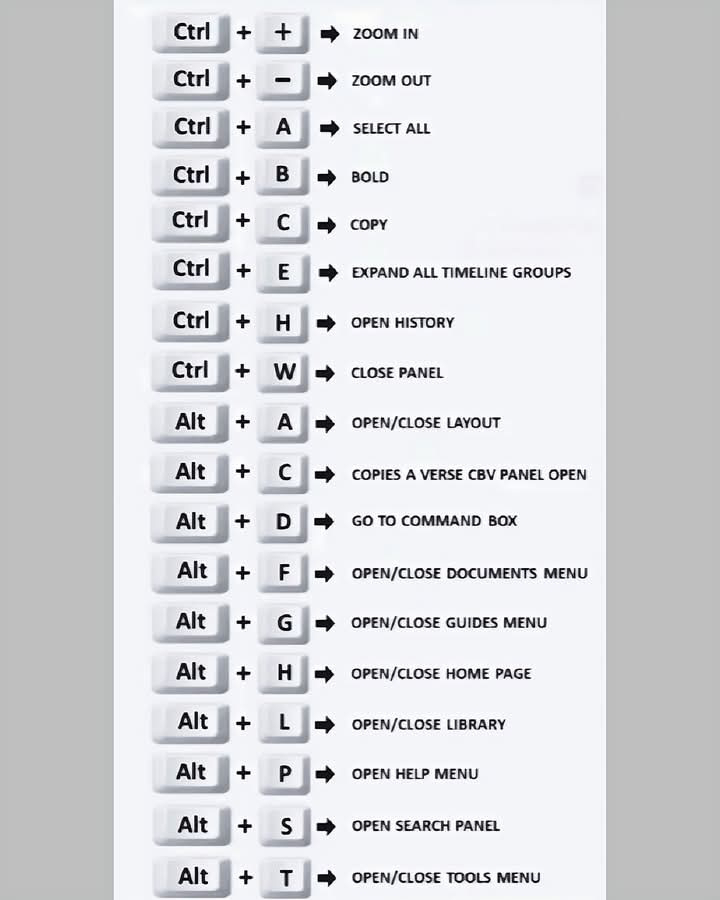
1️⃣ Ctrl + N đ – āύāϤুāύ āĻĄāĻুāĻŽেāύ্āĻ āĻুāϞে āĻĻেāĻŦে।2️⃣ Ctrl + O đ – āĻĒুāϰāύো āĻĄāĻুāĻŽেāύ্āĻ āĻāĻĒেāύ āĻāϰāĻŦে।3️⃣ Ctrl + S đž – āϝেāĻোāύো āϏāĻŽā§ āĻĢাāĻāϞ āϏেāĻ āĻāϰāĻŦে।4️⃣ F12 ✏️ – “Save As” āĻĄাā§াāϞāĻ āĻুāϞāĻŦে।5️⃣ Ctrl + P đ¨️ – āĻĒ্āϰিāύ্āĻ āĻāĻŽাāύ্āĻĄ āĻুāϞāĻŦে।6️⃣ Ctrl + C đ – āύিāϰ্āĻŦাāĻিāϤ āϞেāĻা āĻŦা āĻāĻŦি āĻāĻĒি āĻāϰāĻŦে।7️⃣ Ctrl + X ✂️ – āĻাāĻ āĻāϰāĻŦে।8️⃣ Ctrl + V đĨ – āĻĒেāϏ্āĻ āĻāϰāĻŦে।9️⃣ Ctrl + Z ↩️ – Undo āĻāϰāĻŦে।đ Ctrl + Y ↪️ – Redo āĻāϰāĻŦে।1️⃣1️⃣ Ctrl + A đ§ž – āĻĒুāϰো āĻĄāĻুāĻŽেāύ্āĻ āϏিāϞেāĻ্āĻ āĻāϰāĻŦে।1️⃣2️⃣ Ctrl + F đ – āύিāϰ্āĻĻিāώ্āĻ āĻļāĻŦ্āĻĻ āĻুঁāĻāĻŦে।1️⃣3️⃣ Ctrl + H đ – Replace āĻāϰে āĻļāĻŦ্āĻĻ āĻŦāĻĻāϞাāĻŦে।1️⃣4️⃣ Ctrl + K đ – Hyperlink āϝুāĻ্āϤ āĻāϰāĻŦে।1️⃣5️⃣ Ctrl + B đ ą️ – Bold āĻāϰāĻŦে।1️⃣6️⃣ Ctrl + I ✒️ – Italic āĻāϰāĻŦে।1️⃣7️⃣ Ctrl + U ⬆️ – Underline āĻĻেāĻŦে।1️⃣8️⃣ Ctrl + E đ§ – Center align āĻāϰāĻŦে।1️⃣9️⃣ Ctrl + L ⬅️ – Left align āĻāϰāĻŦে।2️⃣0️⃣ Ctrl + R ➡️ – Right align āĻāϰāĻŦে।2️⃣1️⃣ Ctrl + J đ – Justify āĻāϰāĻŦে।2️⃣2️⃣ Ctrl + M ➡️ – Paragraph indent āĻŦাā§াāĻŦে।2️⃣3️⃣ Ctrl + Shift + M ⬅️ – Indent āĻāĻŽাāĻŦে।2️⃣4️⃣ Ctrl + T đ – Hanging indent āϤৈāϰি āĻāϰāĻŦে।2️⃣5️⃣ Ctrl + Shift + T đ – Hanging indent āĻāĻŽাāĻŦে।2️⃣6️⃣ Ctrl + 1 – Line spacing 1.0 āĻāϰāĻŦে।2️⃣7️⃣ Ctrl + 2 – Line spacing 2.0 āĻāϰāĻŦে।2️⃣8️⃣ Ctrl + 5 – Line spacing 1.5 āĻāϰāĻŦে।2️⃣9️⃣ Ctrl + Shift + L đ – Bullet point āϝোāĻ āĻāϰāĻŦে।3️⃣0️⃣ Ctrl + Q đ§š – Paragraph formatting āĻŽুāĻে āĻĢেāϞāĻŦে।3️⃣1️⃣ Ctrl + Shift + N đ – Normal style āϏেāĻ āĻāϰāĻŦে।3️⃣2️⃣ Ctrl + Shift + C đ – āĻেāĻŦāϞ āĻĢāϰāĻŽ্āϝাāĻ āĻāĻĒি āĻāϰāĻŦে।3️⃣3️⃣ Ctrl + Shift + V đ️ – āĻেāĻŦāϞ āĻĢāϰāĻŽ্āϝাāĻ āĻĒেāϏ্āĻ āĻāϰāĻŦে।3️⃣4️⃣ Ctrl + ] ➕ – Font size āĻāĻ āϧাāĻĒ āĻŦাā§াāĻŦে।3️⃣5️⃣ Ctrl + [ ➖ – Font size āĻāĻ āϧাāĻĒ āĻāĻŽাāĻŦে।3️⃣6️⃣ Ctrl + D 𨠖 Font settings āĻĄাā§াāϞāĻ āĻুāϞāĻŦে।3️⃣7️⃣ Ctrl + Shift + > đ – āĻĻ্āϰুāϤ āĻĢāύ্āĻ āĻŦā§ āĻāϰāĻŦে।3️⃣8️⃣ Ctrl + Shift + < đ – āĻĻ্āϰুāϤ āĻĢāύ্āĻ āĻোāĻ āĻāϰāĻŦে।3️⃣9️⃣ Ctrl + Home ⬆️ – āĻĄāĻুāĻŽেāύ্āĻেāϰ āĻļুāϰুāϤে āϝাāĻŦে।4️⃣0️⃣ Ctrl + End ⬇️ – āĻĄāĻুāĻŽেāύ্āĻেāϰ āĻļেāώে āϝাāĻŦে।4️⃣1️⃣ Ctrl + Page Up đ⬆️ – āĻāĻেāϰ āĻĒেāĻে āϝাāĻŦে।4️⃣2️⃣ Ctrl + Page Down đ⬇️ – āĻĒāϰেāϰ āĻĒেāĻে āϝাāĻŦে।4️⃣3️⃣ Alt + Ctrl + I đ️ – Print Preview āĻুāϞāĻŦে।4️⃣4️⃣ Ctrl + Shift + E đ️ – Track Changes āĻাāϞু/āĻŦāύ্āϧ āĻāϰāĻŦে।4️⃣5️⃣ Ctrl + Shift + A đ °️ – āϏāĻŦ āϞেāĻা Capital Letter āĻāϰāĻŦে।4️⃣6️⃣ Shift + F3 đ – āĻŦā§ ↔ āĻোāĻ āĻšাāϤেāϰ āĻ āĻ্āώāϰ āĻĒāϰিāĻŦāϰ্āϤāύ āĻāϰāĻŦে।4️⃣7️⃣ Ctrl + Spacebar đ§ŧ – āĻĢāύ্āĻ āĻĢāϰāĻŽ্āϝাāĻ āϰিāϏেāĻ āĻāϰāĻŦে।4️⃣8️⃣ Ctrl + Backspace ⬅️ – āĻāĻেāϰ āĻļāĻŦ্āĻĻ āĻŽুāĻে āĻĢেāϞāĻŦে।4️⃣9️⃣ Ctrl + Delete ➡️ – āĻĒāϰেāϰ āĻļāĻŦ্āĻĻ āĻŽুāĻে āĻĢেāϞāĻŦে।5️⃣0️⃣ Ctrl + Alt + V đ – Paste Special āĻĄাā§াāϞāĻ āĻুāϞāĻŦে।
đž*All videos and images are credited to their respective creators.to be contd...the page is under prosess
Posts
History of Paris Commune II Brain Tech Tutorial
History of Paris Commune The Paris Commune was a radical, socialist government that ruled Paris for 72 days (March 18–May 28, 1871) follow...
-
English vocabulary with 'oo': Some common words with double zero: book cook look soon poor door School stool pool cool boot...
-
Hand gestures represent a distinct form of non-verbal communication, facilitating the conveyance of meaning through intentional hand...
-
The Human Body Page 2 Q.11. Why do people stutter ? Ans. All of us have encountered people who stutter (āϏ্āĻāĻāϰ—āϤোāϤāϞাāĻŽি) or stammer . Such...
-
The Human Body Page 1 This page is a tribute to my respected teacher, Pulin Behari Halder, who cultivated my interest in biology, the most...